nudgelearn
Grader

Snap a photo. Graded in seconds.

Point your camera at a finished worksheet. The grader reads every problem, checks the answer, and marks it — showing the correct answer and a one-line explanation on anything wrong.

Demo

How it works, step by step.

A photo goes in; every problem comes back marked, with the correct answer and a note on each mistake. Step through it below.

A finished Algebra 2 worksheet on the desk
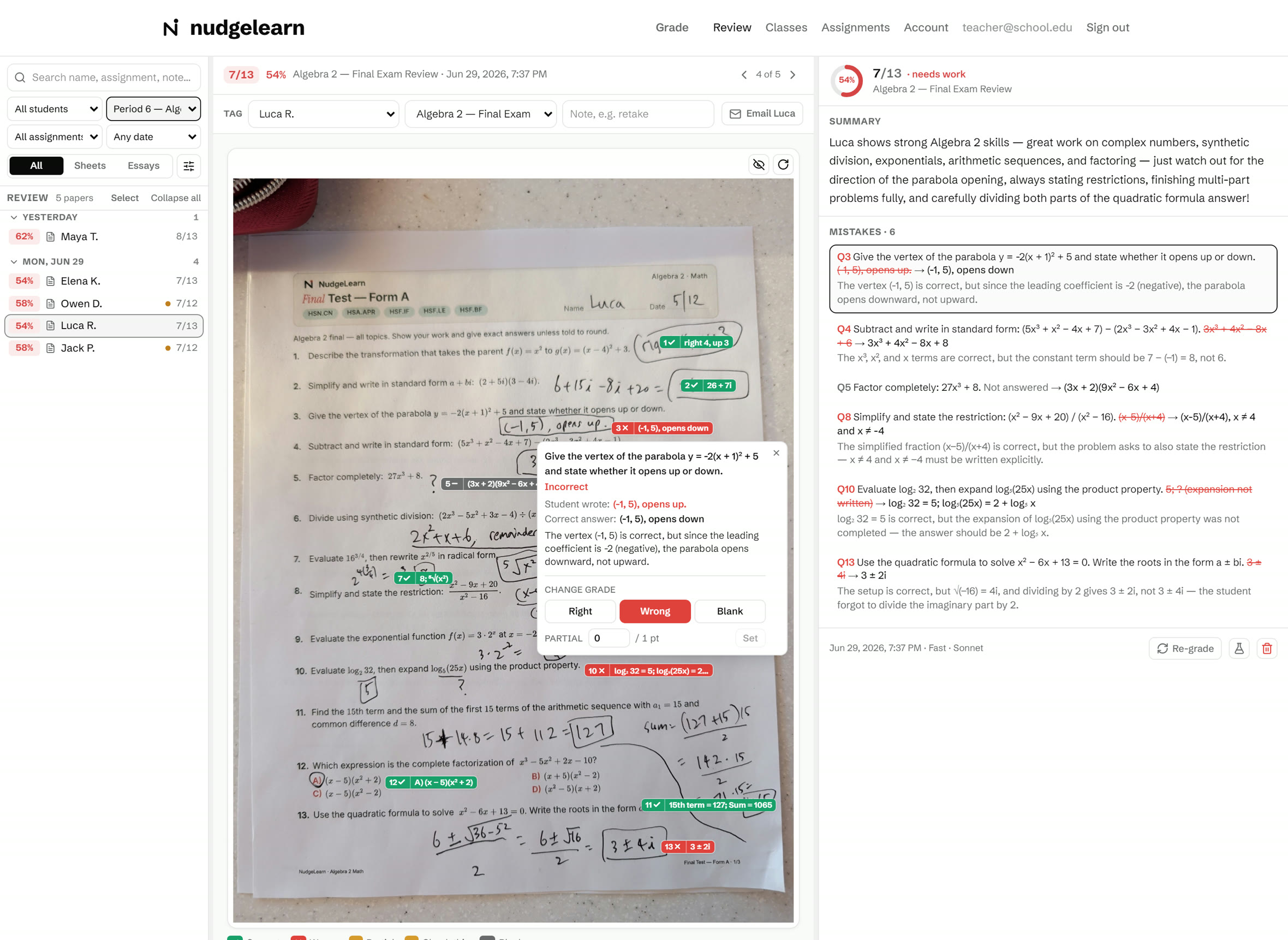
A graded Algebra 2 test — green check and red correction marks next to the student’s handwriting
Score
8/1362%
62

Great effort from Luca — most problems are correct, with a few to review: the vertex direction, a constant term, the log expansion, and the last step of the quadratic formula.

Where it went wrong · Q13
Solve x² − 6x + 13 = 0; write the roots as a ± bi.
✕ Luca: 3 ± 4i✓ Correct: 3 ± 2i

The discriminant is √(−16) = 4i, so the roots are (6 ± 4i) ÷ 2 = 3 ± 2i — the imaginary part still has to be divided by 2.

See it run

The whole flow end to end — snap, read, mark, and a score with every mistake explained.

Subject coverage

What it grades

We grade what has a clear right answer — and flag anything we are unsure about for you to confirm.

Math & Science
Math — every levelPhysicsChemistryBiologyComputer science
English
GrammarVocabularySpellingReading comprehension
Foreign languages
SpanishFrenchItalianGerman
Social studies
HistoryGeographyEconomics

New subject? Test before you grade the stack.

Run 3–5 sample papers first and check the marks. The grader flags whatever it is unsure about, so you will see exactly where to look. Once you trust it on a subject, grade the whole stack.

Questions

Answers for families and schools.

For parents & tutors
How accurate is it?
It works each problem out itself before judging, and accepts any equivalent form — ½, 0.5, and 50% all count, with or without units. Anything it cannot read clearly is flagged amber for you to confirm rather than guessed, and a blank is never marked correct.
What if it marks something wrong?
Anything the grader is unsure about shows an amber “?” and is left out of the score until you resolve it, so a misread never quietly counts against your child. It is most accurate on clear, well-lit photos.
Which subjects can it grade?
Math through calculus, plus physics, chemistry, grammar, vocabulary, spelling, world languages, and more — anything with a single right answer. See Subject coverage above for the full list.
Do I need an answer key?
No — the grader figures out the answer on its own. It is most accurate on NudgeLearn worksheets, where the answer key is built in.
What kind of photo works?
A phone photo, doc-cam capture, or scan — even at an angle, since it auto-rotates the page. Grade one sheet, or upload a whole stack as a PDF and it grades each page.
Is my child’s work private?
Yes. Graded papers are tied to your account and never shared. See our Privacy policy for details.
What does it cost?
Free to start — no card. 30 worksheets a month free; Pro is $20/mo for 300 (one page = one worksheet). See pricing.
For schools & districts
Can I grade a whole class at once?
Yes. Snap or upload the stack and each page is graded as its own paper — built for the photo-per-student workflow. A Pro class roster lets you tag each paper to a student so scores land in the right place.
Do I get per-student analytics?
Pro adds a class roster and full analytics — per-student and per-class scores, misconception tracking, and trends over time — plus CSV / gradebook export to take into whatever you already use.
Does it fit our LMS and rostering?
Institution plans include Google Classroom and Canvas integration, plus SSO / SAML and district rostering through Clever and ClassLink.
How is student data handled?
Graded work is tied to the account and never shared. Institution plans add a custom DPA and are FERPA/COPPA-aligned, with school and district admin oversight.
Is it aligned to standards?
Yes — Common Core (CCSS) today. Additional state standards are on the roadmap; we only claim what we actually align to.
What about volume and unlimited grading?
Institution is unlimited grading for every teacher, with school and district admin dashboards. Pricing is custom and invoiced annually based on your size.
How do we pilot it?
Start any teacher on Free (30 papers/month, no card) to try it on real work. Upgrade individual teachers to Pro, or talk to us about an Institution rollout across the school or district.
Grading at school scale?

Rosters, analytics, LMS, and district rollout — let’s scope a pilot.